
User Experience Researcher

Microsoft Word

Microsoft Teams

Final Report

8 Weeks
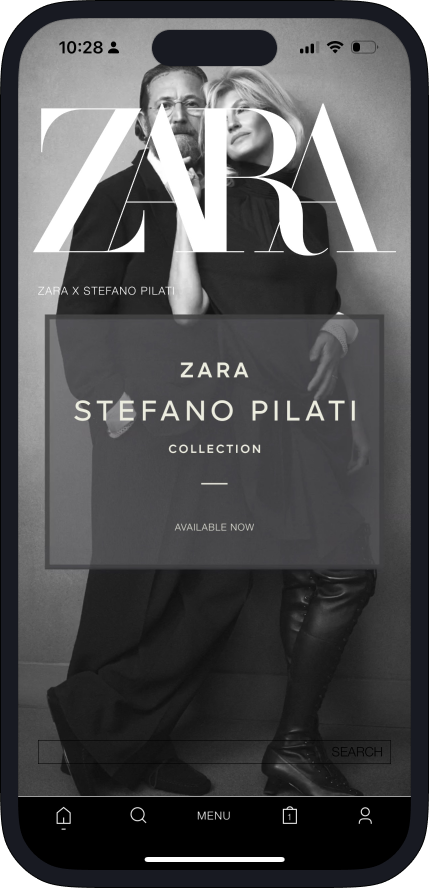
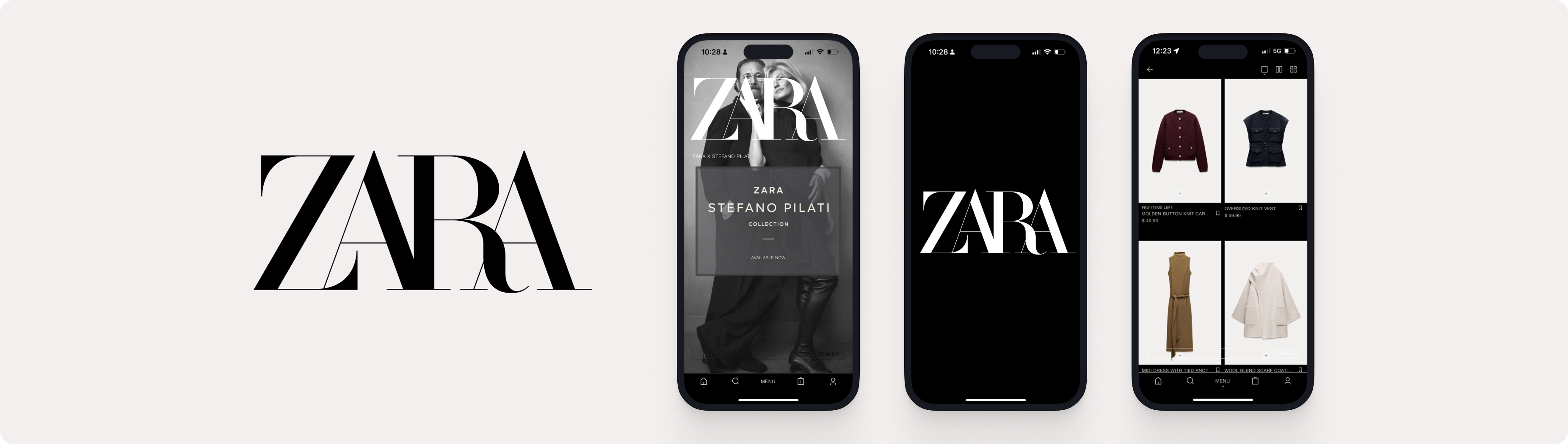
In our usability testing class, my team and I opted to research user experience within Zara's mobile app. If you don't know who or what Zara is, they are a global fast-fashion retailer that offers products to women, men, and kids.
During the eight weeks, my team and I did our research about the brand and app. We recruited users for our usability test through a survey we created and sent out, calculated results and then eventually finalized everything into our final report. Throughout this process we learned from users where the pain points are inside the app and why they are pain points. Watching how users reacted with certain elements, followed by questions on our end, allowed the three of us to learn and gain a deeper insight on designing.
For this research, we used the CIF (Common Industry Format) Methodology with the standard metrics measuring, effectiveness, efficiency, and satisfaction.
Additionally, during our user testings we incorporated the think-aloud method, a pre and post test questionnaire, SEQ (Single Ease Question), and SUS (System Usability Scale). By incorporating these components, we were able to gain a deeper insight on how users operated, why they made that decision, and their throughts as they moved forward.
We started off with a projest proposal, where we detailed the basics of our research, we established that Zara is a global fast-fashion retailer, and their mobile app provides features such as searching, browsing, and purchasing items. Along with Zara's general information, we also determined our operating system, anticipated challenges and issues, and anticipated target audience.
Along with all of the above, we also noted down some perceived issues in the app, such as, complex layouts, unconventionality, and poor accessibility.
Following the proposal, we established three goals we wanted to accomplish during this research.
To determine the overall usability success of Zara’s mobile app according tousers.
To determine issues within Zara’s mobile app that make users’ tasks challenging.
To determine the satisfaction of the users and if they enjoy the design of Zara’s mobile app.
Along with our goals, we also established three evaluation questions that will help guide and direct our usability tests.
How easily and successfully are users able to navigate the mobile app?
How easily and successfully are users able to purchase an item?
How effectively are users able to find product details?
To begin recruiting users for our usability test, we created a screening questionnaire based on the requirements we were looking for. Our requirements included high technology proficiency, high technology usage, and those who have used a mobile shopping app before. In order to find users that fulfilled these requirements, we sent out our questionnaire to friends and family and awaited their responses. In total, we ended up with seventeen responses.
Through the screening questionnaire, we gathered that all of our participants have an Apple Iphone, which is our determined operating system. We also noted that all of our participants use technology on a daily basis, all of them have interacted with some sort of online shopping app, and most of them marked themselves as high technology proficiency. From the seventeen responses we got, we managed to narrow it down to six people.
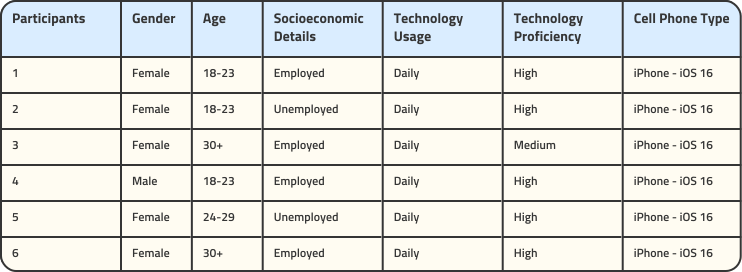
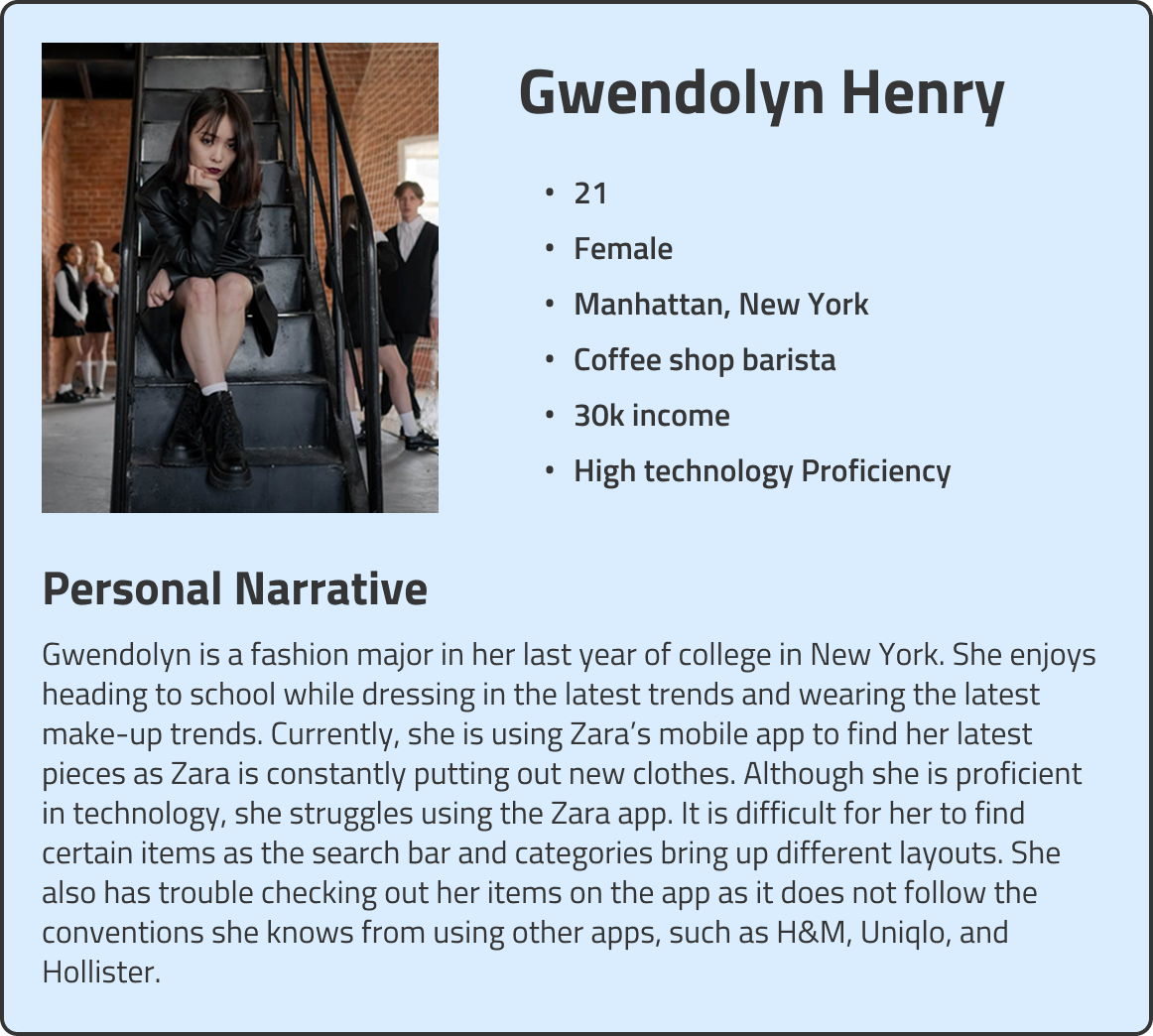
After the results from the screening questionnaire, the three of us each created a persona from the three age groups we recruited, 18-23, 24-29, and 30+. A persona is a fictional representation of your target users, creating one helps us to better understand the goals and needs of said target users. I was in charge of creating a persona for the youngest age group, 18-23.
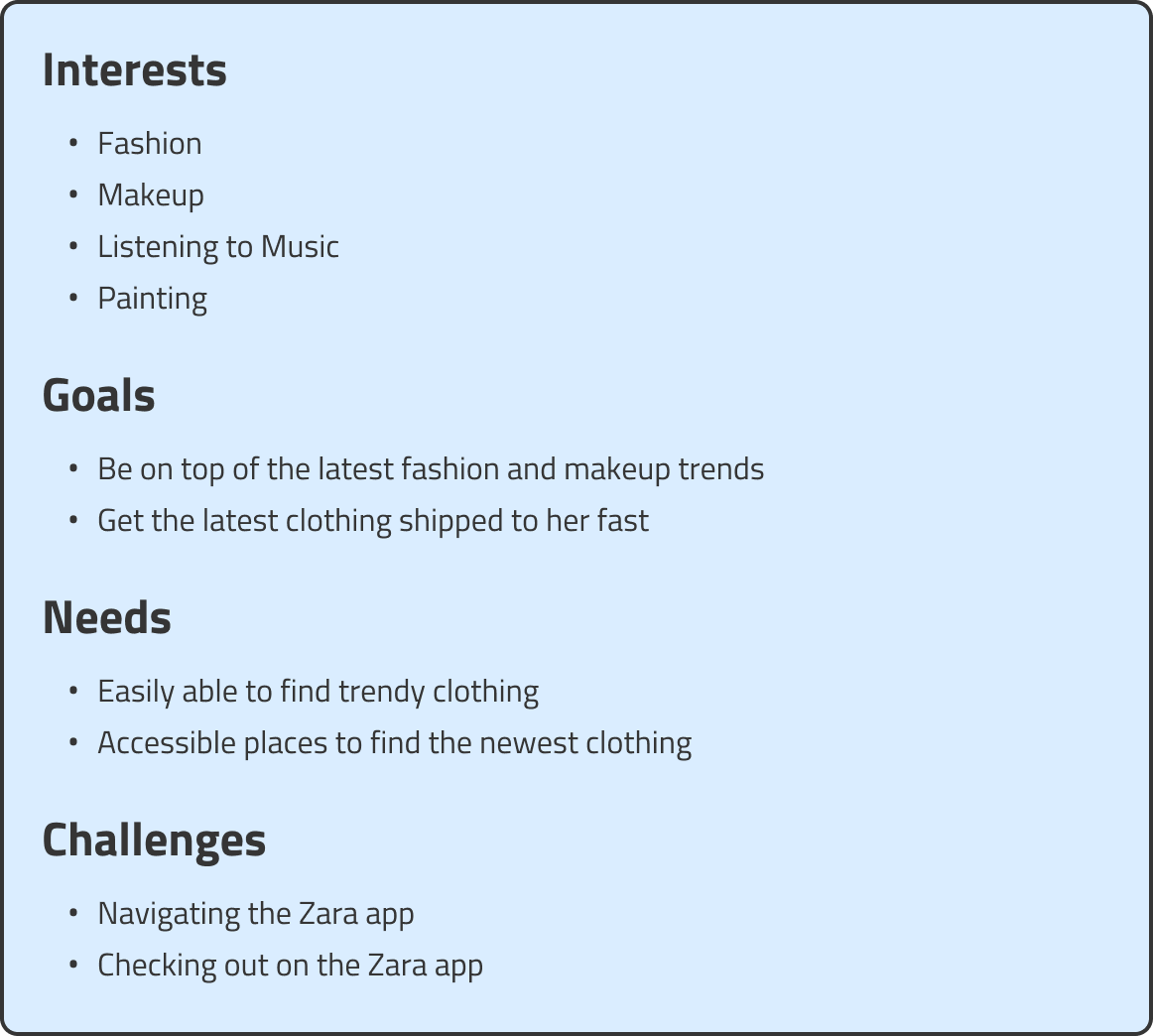
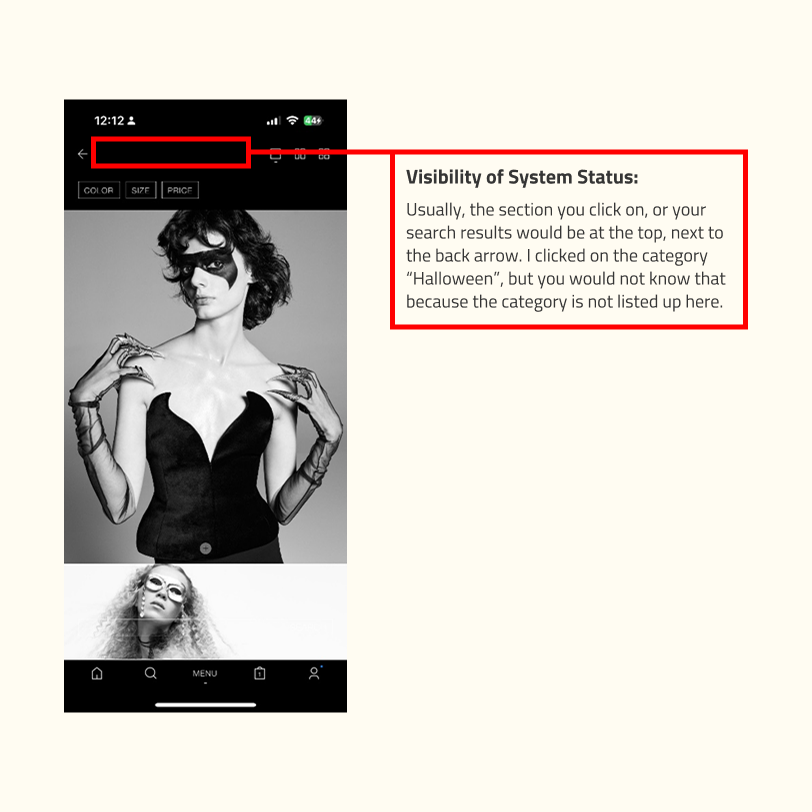
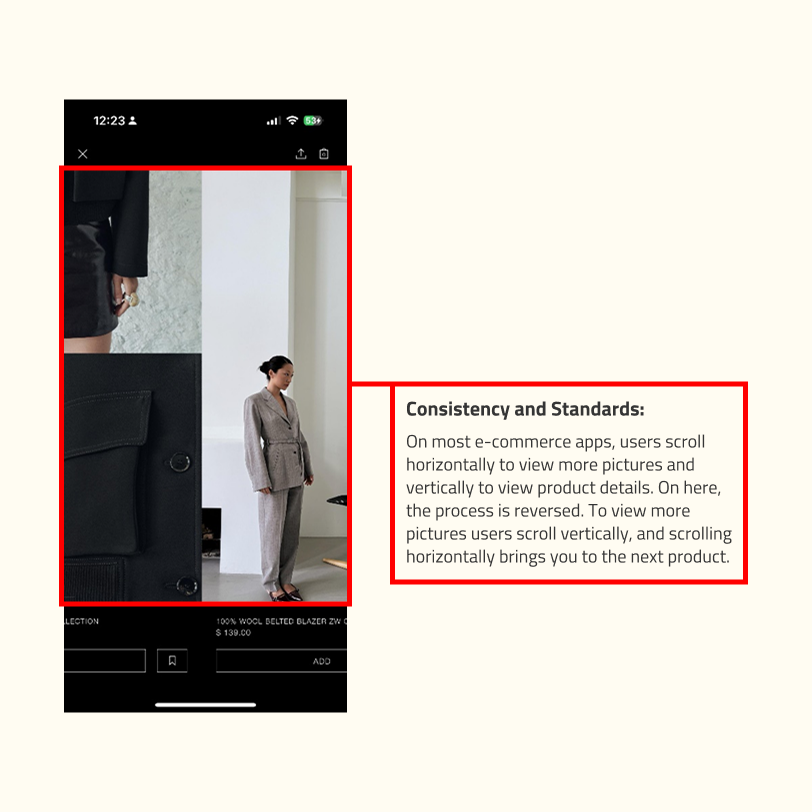
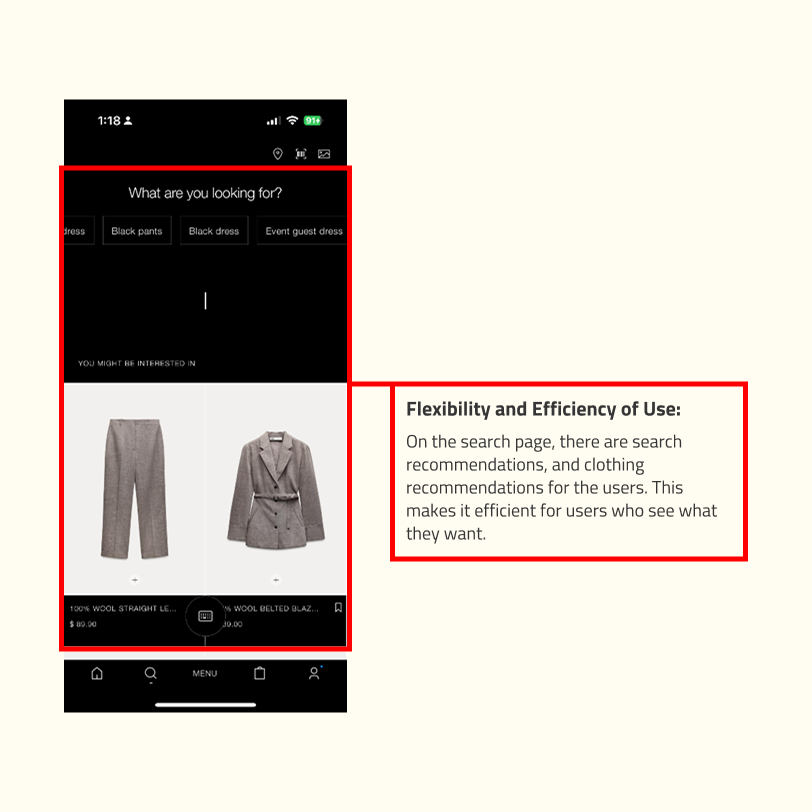
A heuristic evaluation followed after the creation of our personas. For the heuristic evaluation, we utilized Nielsen’s 10 Usability Heuristic, which allowed us to be more specific and comprehensive. We also decided that the best way to tackle the heuristic evaluation was to split the workload evenly among the three of us, with someone taking on an extra one, and that would be me! So, I became in charge of these four usability heuristics, visibility of system status, consistency and standards, flexibility and efficiency of use, and help users recognize, diagnose, and recover from errors.

After completing all of the steps above, we are finally getting closer to the usability testings! The next step for us was to create three tasks for the users to accomplish during their usability testing. We let our tasks focus on searching for items based on filtering, finding product details, and adding products to the favorites tab. With some advice from our professor, we tweaked the tasks until they were ready to be tested!
.svg)
Finally after all the research and analyzation was done for, we we began with the usability tests. We began with a pilot test, and thankfully we did, because we had a lot of trouble getting video equipment on both sides to work.
Initially, we opted to use Zoom, an online video conferencing application, however we soon found out that Zoom had a limit of 40 minutes that was free. Quickly, we switched over to Microsoft Teams, another online video conferencing application, and found out that users were able to join the meeting on two devices at once with Teams. Our new plan was to now have users join the meeting on their phone, with the Zara app downloaded and share that screen to us. Then, join on a second device where we are able to see their face and expressions through the test.
After all that, we were now finally able to begin our usability tests. Our testing procedures went like this:
Obtain participant consent via a consent form.
Setting up meeting time and sending over the meeting link.
Reading orientation script.
Pre-test questionnaire
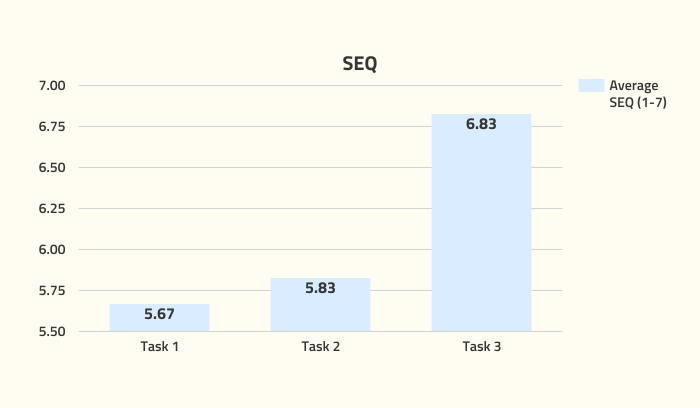
Start the usability test with a SEQ (Task-Level Subjective Evaluation) following each completed task.
After the tasks are done, participants will complete a post-test questionnaire following a SUS (a Session-Level Subjective Evaluation).
Post-test interview
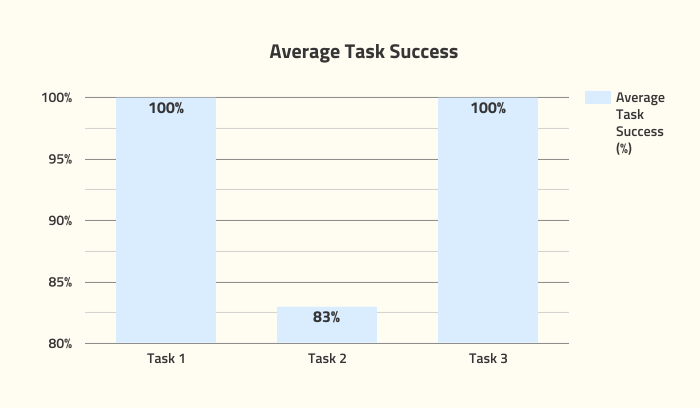
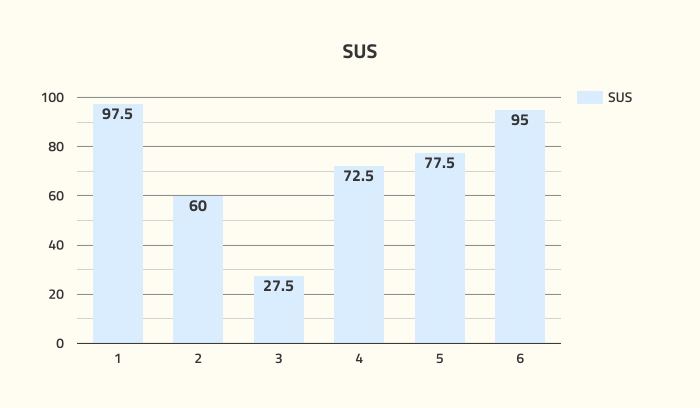
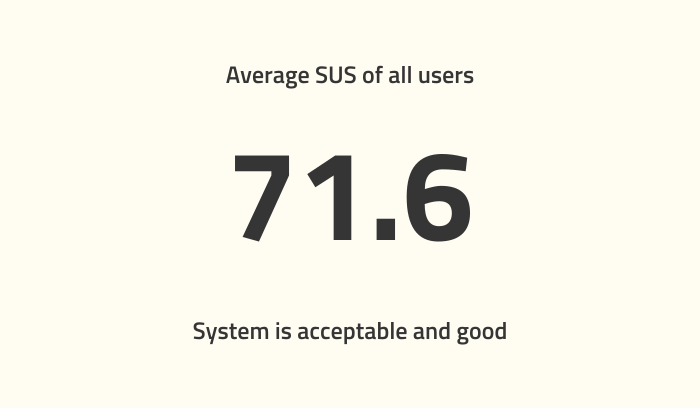
After the interviews, we have come to the results of this research! The average of all users' SUS score is 71.6, this means that while the system is good and acceptable, changes can be made to have a better score. Some key findings we have compiled are the users' average task success, and the SUS scores.
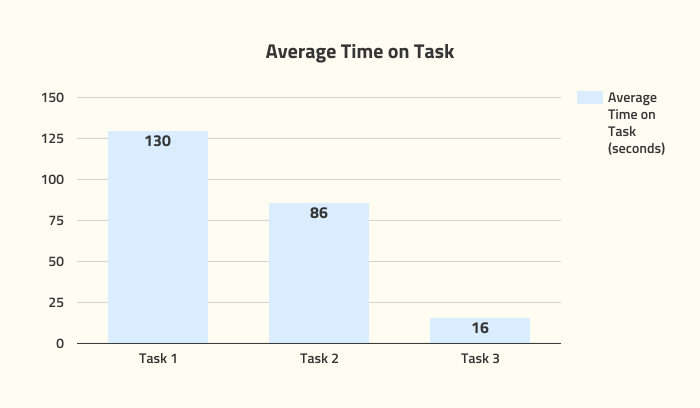
For average task success, we actually had one user fail task 2 (find the composition details for a pair of jeans), they completely gave up on it after a minute of trying to complete the task. When asked if they had any thoughts afterwards, their last words to us about this task was, "This is stupid." For the SUS score, although not horrible, the majority of them fall in the range of the average SUS, meaning the system can be improved upon for better user experience.
Although the findings weren't as terrible as we thought it would be, some items can still be addressed. Users agreed that the movement/animation in the app can be decreased, details are hidden by unconventional scrolling, and filters and search bars are inconveniently placed.
Although it seemed like this research would never end, my team and I persevered and we finally made it! In the beginning, all three of us had no experience with user experience research, but through this process we learned many valuable knowledge, and learned to be confident while conducting this research. A lot of planning went into the final draft of the paper, and we were consistently meeting up, communicating with each other, and updating each other on announcements and work statuses. Without any form of communication, this report would not be as organized and informative as it was. I am really happy with how our final report came out, all the meetings, writings, interviewings, last minute edits were all worth it as our paper was used as an example for the next incoming class! Finally, I want to thank my teammates, Ella and Jaylah lots for completing this research project with me!
If there was one thing I wish we could've done better, was maybe creating more detailed tasks. There were a lot of sections in the app we didn't quite get to explore, and our tasks were on the shorter side. In the next research project I will most definitely apply what I have learned though!